What’s new on RVTS: Faster Listing Creation
Howdy, Travel Scouts! 👋
Welcome to the first edition of the RV Travel Scout “what’s new” blog series. Published once or twice a month, this is where you’ll get all the latest and greatest information about new features and other exciting changes to the RVTS platform. Buckle up!
Members, Listings, and Reviews—Oh my!
Travel Scout is up to a whopping NINE intrepid members—only two of whom are related to me by blood or marriage! This is up from one lonely user as recently as April before I sat down on the couch with my wife and forced her to create an account, instantly doubling our membership. I’m crossing my fingers that we’ll blow past the double-digit threshold by the end of July. If you know of anyone who might be interested in contributing to the future’s best RV review platform, please send them to rvtravelscout.com/register posthaste. Thanks in advance for your support!
As of this writing, RVTS has 63 listings and 47 reviews. Those aren’t bad numbers given that the site only went public about three months ago. And it won’t be long before we catapult from those few dozen listings to several thousand. Up until now, I have very consciously avoided the prospect of creating listings in bulk because I wanted to spend a significant amount of time using the site rather than just building it. Those are two very different mindsets. Sure enough, over the past few months, I found that a number of my initial assumptions about how the site should work didn’t quite line up with how I actually used it. In that time, I’ve made many, many improvements both big and small—some of which I’ll talk about below—and now I’m finally getting ready to “pre-load” the site with thousands of vetted RV parks, rest stops, and road hazards. A bit further down the road (ha), I’ll also explore adding dump stations, RV repair shops, and gas stations. I’m starting with the first three categories entirely because I already have a line on some quality data sources for them. The others will require further research.
Even though adding new listings to Travel Scout has gotten super fast and easy, it would be even better if you didn’t have to. By the time we close the door on 2026, my hope is that manually creating new RVTS listings becomes the exception rather than the rule. That might be a somewhat ironic segue to my next topic, but nevertheless, let’s talk about the new and improved process for (manually) creating RVTS listings!
Creating New Listings FAST ⚡️
If there was one major, overarching focus in June it was on speeding up the process of adding new Travel Scout listings. This touches on what I consider one of the riskier aspects of creating a crowdsourced platform like RVTS: incentivizing average, everyday RVers to add new rest stops, roads, repair shops, and other such places. It’s already a tough sell to get people to write reviews. You might be familiar with the so-called “90-9-1” rule. It posits that 90% of users will consume content but never contribute, 9% will contribute occasionally, and a paltry 1% will create the overwhelming majority of content. This reality makes it imperative that creating listings and publishing reviews are as quick, easy, and seamless as humanly possible. To do this, I employed everyone’s favorite bugaboo: AI.
RV Parks
I know, I know. These days, AI is often injected into areas where it makes little sense and amounts to nothing more than a flashy buzzword. (“Oooh, look at us! WE have AI TOO!!”) But in this case, it’s genuinely useful. Take RV park listings, for example. Since they require the most information to create, they also took the most time. Not anymore. Today all you need to enter is the park’s web URL and its physical address, then click the Populate Details button and boom! (almost) all required fields are automatically populated based on information found on the park’s website.
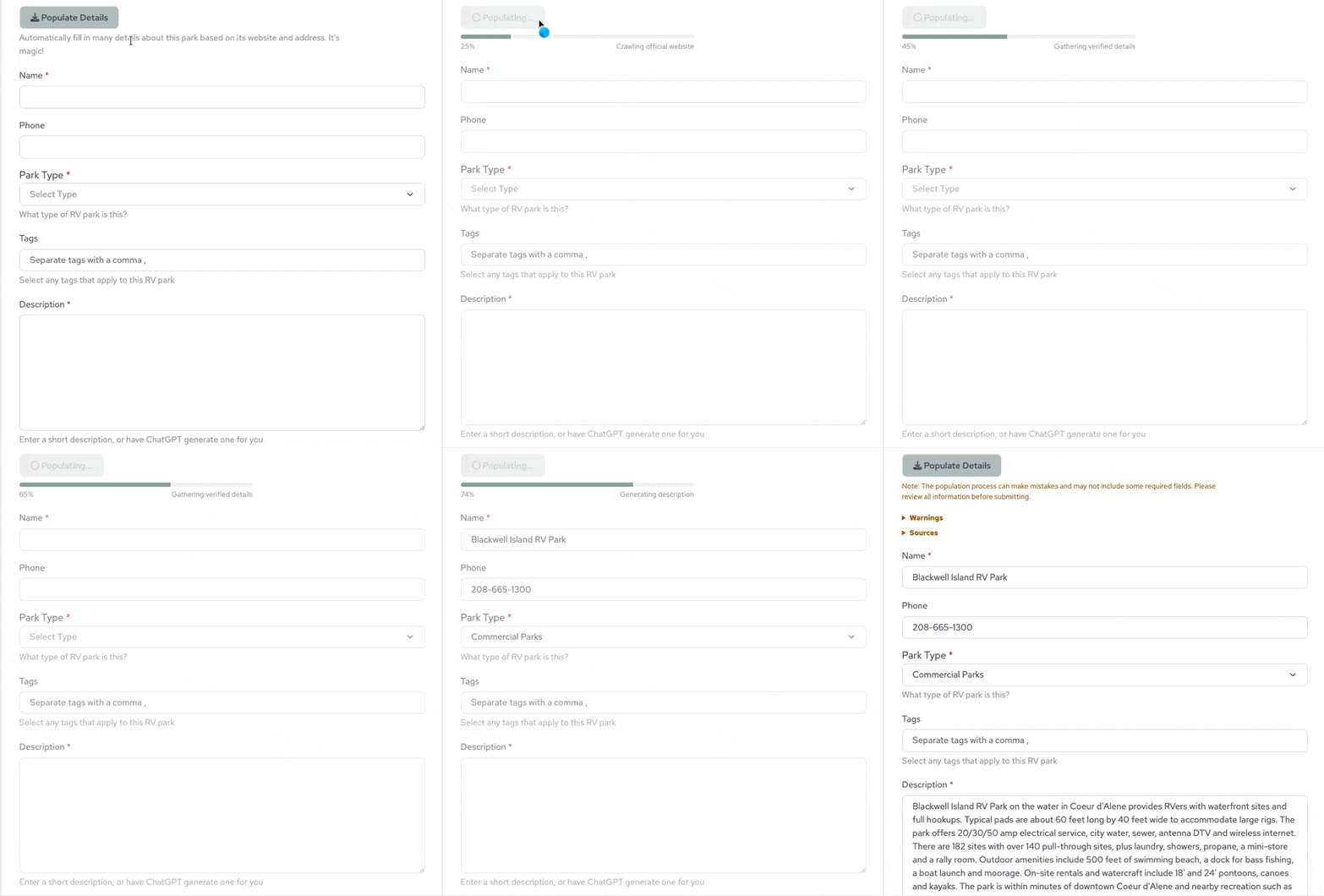
Is this process perfectly accurate 100% of the time? No. But it’s awfully close and a huge timesaver. Ultimately, perfect accuracy isn’t the goal on the first pass anyway. The real objective is getting the listing created as expediently as possible, so you and other RVTS members can focus on writing reviews—providing your unique and distinctive experiences, exactly the type of thing that can’t be auto-generated by AI. And rest assured: all new listings are manually reviewed for accuracy and completeness by our team of highly trained, carefully vetted RV travel experts. (Me.)
While the Populate Details button is unique to RV parks, all Travel Scout listings now include helpful tools (both AI and non-AI) that help speed up the creation process.
Rest Stops
RV Travel Scout takes a very broad view of what constitutes a “rest stop.” Here, they include the normal rest areas, scenic overlooks, and welcome centers that most people think of when they hear the phrase “rest stop.” But we don’t stop there. We also include everything from unmarked turnouts to large grocery store parking lots. Since many of these places do not have street addresses, Travel Scout instead relies on latitude and longitude to identify their location. But how do you reliably obtain those coordinates? We provide three ways. First, if you happen to be physically located at the rest stop, you can click the Use my location button. Second, you can use Google Maps. Just right-click on the location of the rest stop, copy the coordinates, then paste them into the form. (On mobile, the process is slightly different. See below.) The third option is my favorite. Just upload a photo of the rest stop—something that I’d love for you to do anyway—and the GPS coordinates will be automatically extracted.
Some manual data entry is still required. You’ll need to enter a name, its type (picnic area, travel center, turnout, etc.), the services available, and a description. For the description, all you need to do is dump at least 100 characters of raw, unfiltered notes, tidbits, and observations about the rest stop, then click Rewrite, and right before your very eyes, it will be faithfully translated into beautiful, readable prose.

Fuel Stations
Unlike RV parks, most fuel stations don’t have websites filled to the brim with detailed information about all the services and amenities that appeal to RV travelers. Consequently, there’s no way to automatically import that information into RVTS with any degree of completeness or accuracy. But at least you won’t have to spend much time carefully crafting a thoughtful description of the Love’s station you just visited in the far reaches of Montana. Just like with rest stops, all you have to do is jot down rough notes about the fuel station in question, then click the Rewrite button. We’ll throw your word salad into the AI blender and turn it into a delicious concoction of literary wonder.
Dump Stations
Dump stations are somewhat anomalous because they’re almost always part of an RV park, rest stop, or fuel station. In those cases, it’s important to create the listing for the RV park, rest stop, or fuel station first. Once that’s done, all you have to do is go to the listing and click the Add Dump Station button. This will automatically populate the new dump station form with details from the corresponding RV park, rest stop, or fuel station and link the two listings together. Easy peasy.

On the other hand, stand-alone dump stations that are not associated with an RV park, fuel station, or rest stop should be created the normal way, like all other listing types. In these cases, we won’t be able to pre-populate the form, but we can definitely help you write the description. Just like when creating rest stops and fuel stations, all you need to do is scrawl out the most relevant details and observations, then click Rewrite and you’re done.
Service Centers
RV repair shops, or Service Centers, as they’re known on RVTS, typically have juuuuust enough information on their websites that RVTS can automatically write descriptions, but not enough that we’re able to pre-populate the rest of the form like we do with RV parks. Fortunately, most of this information is pretty easy to gather. Address. Phone number. Operating hours. And then, when you get to the description field, just press the Write button to automatically generate an accurate, readable passage.
Roads
Like rest stops, roads are tied to a specific latitude and longitude and you have the same three options for providing them: 1) Clicking Use my location, if you happen to be on that road right now; 2) Copy/pasting the coordinates from Google Maps; 3) Uploading a photo. Here again, the third option is my favorite because it kills two birds with one stone: providing imagery for the listing while simultaneously yielding its location. Once the coordinates are populated, you’ll be presented with several suggested names for your road entry. You can use one of these, or create your own. The choice is yours.
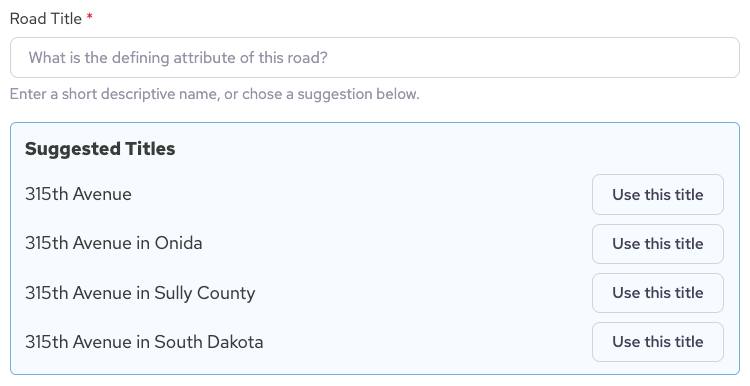
The last thing needed for a road entry is a description, but writing one is no different than it is for rest stops, dump stations, or fuel stations: just dump at least 100 characters of facts, tidbits, and other information relevant to the road, then click Rewrite. Like magic, AI will turn your rough notes into a suitable road description.
Summary
Whew! That was a lot of words, but if you read this far, hopefully you’re feeling inspired to create a slew of new RVTS entries because it’s soooo eeeeeeasy!
Of course, none of this functionality is perfect. The other day I tried creating an entry for Caprock Canyons State Park and the Populate Details process bombed about halfway through. 😢 💩 I’ve already got a solution in the works, but I point this out because you too might encounter a moment of frustration while creating a listing. If so, just let me know so I can fix it!
Just in case you’re wondering…
Although RV Travel Scout will continue to make judicious use of AI to help build a better RV review platform, every article published here—and on my personal site, Traveling WorkerBees—has been and always will be written by this plucky human the old-fashioned way. 🙂
P.S.
This article originally included a teaser about “smarter search filters”. That was included by mistake, but stay tuned because that’s coming very soon!