
Getting Started
with RV Travel Scout
RV Travel Scout’s mission is simple:
Whether you’re here to discover great places, share your own experiences, or both, this guide will quickly get you up to speed. By the time you’re done, you’ll understand what makes RV Travel Scout different—and how to get the most out of it. For more detailed information, take a look through our FAQs. And if you’re interested in learning more about Travel Scout’s origin story, we’ve got a quick history for you here and a longer version over here.
Ready to get started? Let’s go.
Create Your Free Account
An account isn’t required in order to read and explore RVTS listings, but registration has its privileges! It only takes a minute and entitles you to amazing and wondrous capabilities including
- Rating and writing reviews for places
- Saving places to your favorites or one of your custom lists
- Following other members
- Creating new listings for RV parks, rest stops, fuel stations, dump stations, service centers, and roads
- Help improve listings by suggesting edits
Click here to create an account, if you haven’t already.
Complete Your Profile
While you are absolutely welcome to enjoy Travel Scout while cloaked in mysterious anonymity, we think you’ll get the most out of it by letting other scouts get to know you. Tell us what RV you own and, if you tow, what vehicle you use. Add a profile photo and banner image, choose your preferred display name*, share your website or YouTube channel (if you have one), and write a short bio. These details help other scouts understand what kind of traveler you are, making your reviews more meaningful and helping like-minded RVers find you.
To edit your your name, email address, bio, RV information, or social accounts, head over to your account page.
To change your avatar or banner image, visit your profile page. Click the little camera icons that are at bottom left of your avatar and the top left corner of your banner image. They can be a little hard to see, but they’re there—promise!
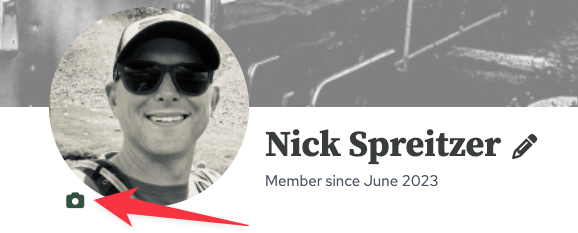
* Note that your display name defaults to your full name, but you can change it to either First Name + Last Initial or your username.
Find Places
When it comes to finding places on RVTS, there are two approaches you can take: Exploring and Searching.
If you know exactly what you’re looking for, Search is probably where you should start. Search lets you precisely drill down to the listings you want using location, keywords, distance, ratings, amenities, and dozens of other filters that vary depending on the type of listing. Whether you’re looking for a highly rated RV park within 25 miles of your route, a fuel stop with both DEF and diesel, or a dump station that has potable water, Search helps you quickly narrow the results to exactly what you need.
Explore is better when you don’t have a specific destination or set of criteria in mind. Start by clicking the Explore menu, then chose a category to browse through collections of listings, discover places you might not have found otherwise, and see what’s available. It’s a great way to stumble across hidden gems or simply get a feel for what’s out there.
Follow Other Scouts
This is where the magic happens. As you read reviews, you’ll inevitably come across scouts whose travel style, priorities, and expectations are just like yours. Maybe they own a similar rig. Maybe they prefer quiet public campgrounds over luxury RV resorts. Or perhaps they simply write thoughtful, detailed reviews that you find consistently helpful. When you encounter someone like that, you might think “Dang, I wish I could get notified every time that person writes a new review.”
On RV Travel Scout, you can do exactly that!
When you find someone whose opinions you value, click Follow on their profile. You’ll then be notified by email whenever they publish new reviews, turning RVTS into the passive discovery network where great places find you—not the other way around.
Need a Scout to Follow?
Feel free to start with me. I’ve reviewed dozens of RV parks, rest stops, fuel stations, service centers, and roads. Click here to see what I discover next!
Writing Reviews
Writing a review is easy.
Start by selecting an Overall star rating. This is the only required rating. Most listing types also include additional category-specific ratings, such as cleanliness, accessibility, or site spacing. These are completely optional—if a rating doesn’t apply to your experience or you simply don’t have an opinion, just leave it blank.
Next, write whatever you’d like to share about your visit. Whether it’s a detailed review or just a few helpful sentences, your experience can help fellow scouts make better decisions.
If you have photos, be sure to upload them—they’re often just as valuable as the review itself.
When you’re finished, click Submit Review. That’s it! Your review will be published and become part of the growing RV Travel Scout community.
Creating Listings
Every listing on RV Travel Scout starts with someone like you. 💪 We’re worked hard to make this process as quick and painless as possible.
Start by opening the Create menu, then selecting the type of listing you’d like to add. Each listing type has a short set of instructions at the top of the form to help you get started.
Fill out as much information as you can, then click Submit.
Don’t worry about making your listing perfect. Every new listing is reviewed by the RV Travel Scout team for completeness and accuracy soon after its been submitted. Missing details can always be added later, either by you or by other scouts.
The most important thing is simply getting the place into the system so it can be reviewed and made available to the entire community.
Note that listing descriptions are subject to editorial review in order to ensure desired length and tone.
Need Help? Have a Question?
We want to hear from you! Reach out anytime at hello@rvtravelscout.com, or fill out our contact form. We’ll get back to you as soon as possible.